Circle of Confusion
...I once was lost...Limboville 居士
Saturday, February 16, 2008
Photo Stitching
I took several pictures of the panoramic view of the Disney Music Hall. I want to merge them together. The photos were taken using a tripod but not with a pano head. I tried Photoshop CS2's a Photomerge commend first. The original pictures look like this:

Here is the result:

The perspective is incorrect and the the images are not lined up. It appears Photoshop's Photomerge expects the users to do some manual adjustment if the input images are not in correct perspective or taken without a pano head. Photoshop Photomerge can output the merge images as separate layers so you can stretch and correct the image to make them line up perfectly. But that take effort and I woudl rather the "computer" does it.
Next I tried PTGui. PTGui analyzes each images, figure out the correct perspective and alignment points and put the whole thing together automatically. The result look a lot better:

PTGui is $120USD or $226USD for the pro version. Here is the feature list. The regular version handles all pano stitching needs. The Pro version adds more image processing functions like HDR merge, vignette/view point correction. There must be good reasons for the Pro version to more than double the price. But it's not clear to me just looking at the feature list. One of the added feature is HDR merge. This can be import because (I'm guessing) very often wide scene can have extreme contrast and no one exposure setting can capture the whole range. HDR merge allows multiple exposure settings for each frame of the pano shots and get more natural result, like what the eyes see instead of what the camera can capture. My take is the added features in the Pro version are for very high image quality requirement.
Is it worth the money? I think it's. Consider a good pano tripod head can cost hundreds. With this program, you can do pano without one. This save you hundred $$ and you don't have to carry one. For me, I just like to do photography. I don't like having to carry a lot of gears. PTGui lets you do pano with just a tripod. But of course, using a pano head would make the result better. Additionally, PTGui is some serious image processing software. Just look at its UI:
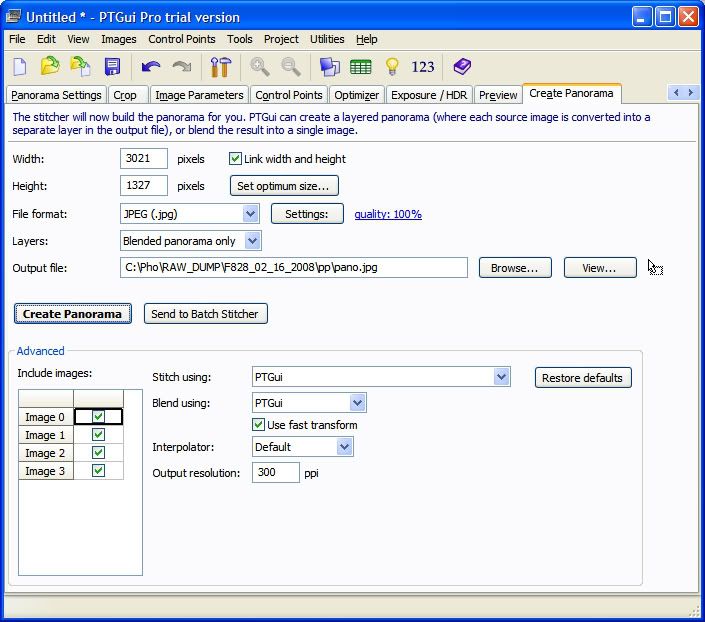
There is a vast array of controls and settings. One of the feature is "No need to keep the camera level: PTGui can stitch rotated and tilted images". You just take the picture and PTGui will put them together for you. Obviously some very sophisticated code in this program. It puts Photoshop's Photomerge to shame. Whoever put this together deserve $120USD if you end up stitching just one decent image.
But then again, I think $120USD price is enough to make me pause. If the price is $79USD, I would buy it without much second thought. I don't need pano stitching that much. Only once in a while. $120USD for a once in a while need is too much.

Here is the result:

The perspective is incorrect and the the images are not lined up. It appears Photoshop's Photomerge expects the users to do some manual adjustment if the input images are not in correct perspective or taken without a pano head. Photoshop Photomerge can output the merge images as separate layers so you can stretch and correct the image to make them line up perfectly. But that take effort and I woudl rather the "computer" does it.
Next I tried PTGui. PTGui analyzes each images, figure out the correct perspective and alignment points and put the whole thing together automatically. The result look a lot better:

PTGui is $120USD or $226USD for the pro version. Here is the feature list. The regular version handles all pano stitching needs. The Pro version adds more image processing functions like HDR merge, vignette/view point correction. There must be good reasons for the Pro version to more than double the price. But it's not clear to me just looking at the feature list. One of the added feature is HDR merge. This can be import because (I'm guessing) very often wide scene can have extreme contrast and no one exposure setting can capture the whole range. HDR merge allows multiple exposure settings for each frame of the pano shots and get more natural result, like what the eyes see instead of what the camera can capture. My take is the added features in the Pro version are for very high image quality requirement.
Is it worth the money? I think it's. Consider a good pano tripod head can cost hundreds. With this program, you can do pano without one. This save you hundred $$ and you don't have to carry one. For me, I just like to do photography. I don't like having to carry a lot of gears. PTGui lets you do pano with just a tripod. But of course, using a pano head would make the result better. Additionally, PTGui is some serious image processing software. Just look at its UI:
There is a vast array of controls and settings. One of the feature is "No need to keep the camera level: PTGui can stitch rotated and tilted images". You just take the picture and PTGui will put them together for you. Obviously some very sophisticated code in this program. It puts Photoshop's Photomerge to shame. Whoever put this together deserve $120USD if you end up stitching just one decent image.
But then again, I think $120USD price is enough to make me pause. If the price is $79USD, I would buy it without much second thought. I don't need pano stitching that much. Only once in a while. $120USD for a once in a while need is too much.
posted by Matthew # 7:46 PM 
Comments:
<< Home
You have brought up an excellent question. I believe that if you used PS3 Extended version photomerge you would find that you do not need a panohead and the result would be perfect. The additional capabilities of CS3 Extend are like night and day. I would not spend the money on ptgui and CS3 too. I have shot some night shots of our city panorama with tall buildings and bridges with remarkable results. Alex

@alex: You don't need panoheads if you make landscape panoramas. But, for inner spaces -- panohead is "a must".
@Mo: I use hugin (open source) or autostitch. For example, this panorama:
http://www.panoye.com/panorama-show.280.html
Is made with autostitch, without tripod (from hand).
@Mo: I use hugin (open source) or autostitch. For example, this panorama:
http://www.panoye.com/panorama-show.280.html
Is made with autostitch, without tripod (from hand).
Hello Matt,
When making panorama by stitching, use one manual exposure setting for all pictures. Do not use auto exposure. So after stiching, the photo looked more even.
Joe
Post a Comment
When making panorama by stitching, use one manual exposure setting for all pictures. Do not use auto exposure. So after stiching, the photo looked more even.
Joe
Subscribe to Post Comments [Atom]
<< Home
Archives
August 2005 September 2005 October 2005 December 2005 January 2006 February 2006 March 2006 April 2006 December 2006 January 2008 February 2008 March 2008 October 2009

Subscribe to Posts [Atom]